Birasyo AI
Write your question, get the answer from your own records
Birasyo AI is the AI assistant that works inside the ERP. It reads your invoices, customer and supplier accounts, stock and payroll, and answers your question from those records. You do not wait for a report to be prepared.
The assistant's ready-made questions
Ready on the assistant screen and asked with a click
Accounting and finance
- How much is this month's VAT?
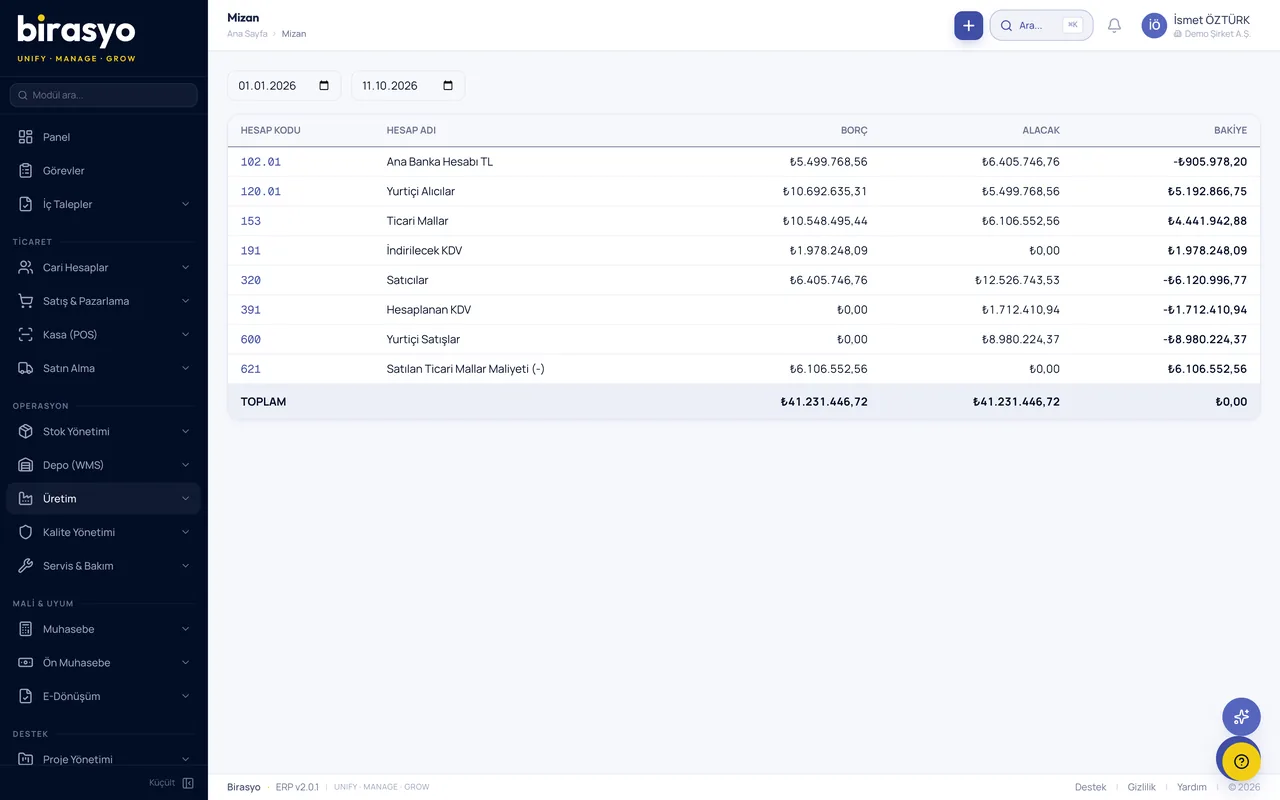
- Is the trial balance balanced?
- Are there any journal entries awaiting approval?
- List of overdue receivables
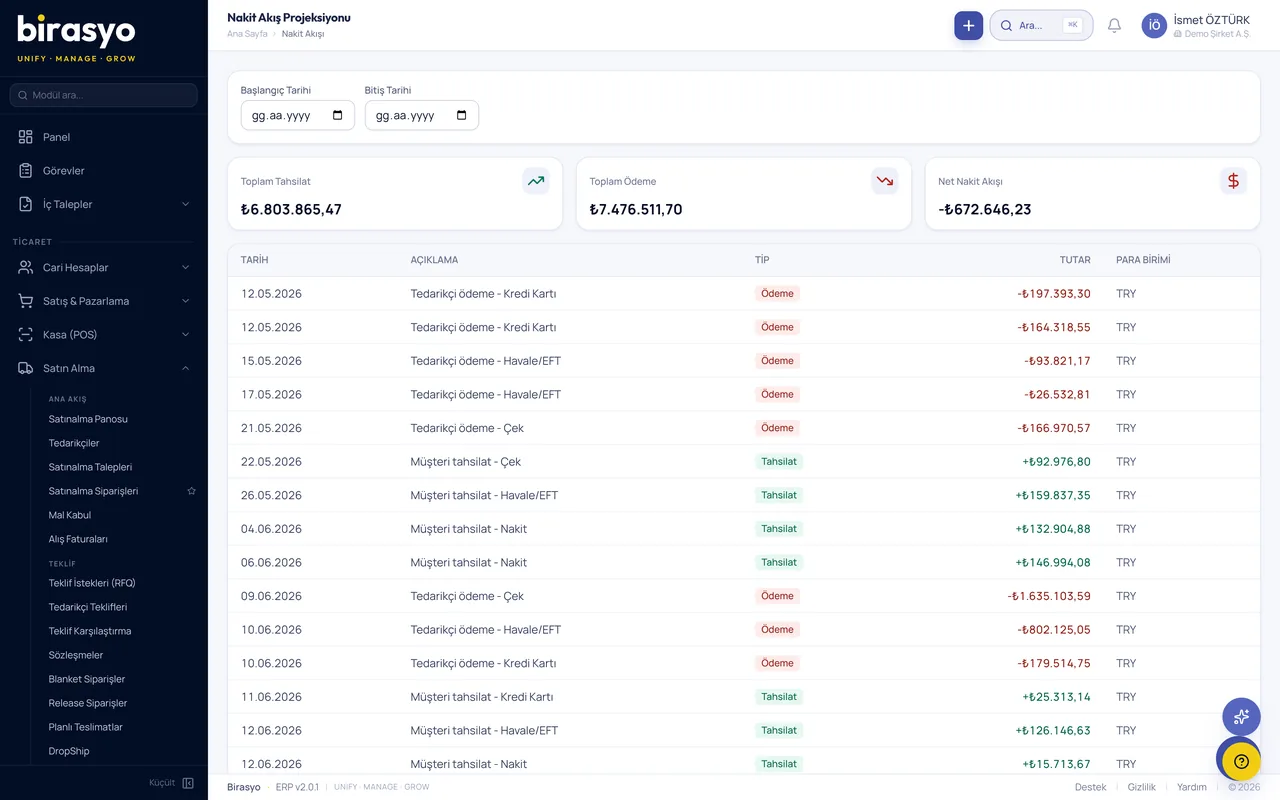
- What is the cash position?
Human resources
- What is my leave balance?
- This month's payroll summary
- Are there any expired documents?
- Open positions
Sales, stock and operations
- Products at critical stock level
- Sales of the last 7 days
- Status of active projects
- Upcoming maintenance plans
What does Birasyo AI do?
The assistant is part of the ERP and is not installed separately. It does every task by looking at the information recorded in the system.
Answering questions
You write your question in plain language. The assistant reads the relevant records and gives the answer, showing which record it is based on.
Report preparation
You describe the report you want. The filters are set up from your description, and you get the result as PDF or Excel.
Document reading
Invoice, dispatch note and contract PDFs are read, and the information in them is passed to the relevant module as data.
Matching and reconciliation
Bank statements are matched with collections and purchase orders with invoices. Unmatched items are listed separately.
Unusual records
The assistant catches transactions such as unexpected spending, duplicate invoices and stock differences, and shows them to the relevant person.
Correspondence drafts
It prepares drafts for customer replies, follow-ups after a quote and collection reminders. You edit them before sending.
Forecasting
It forecasts sales, cash flow and stock needs by looking at your past records.
Recurring tasks
You define tasks such as “Send the finance report to the manager on the first day of every month” by writing them out.
The path a question takes through the assistant
To be able to trust the assistant's answer, you need to be able to check it. That is why the record each answer is based on is shown next to it, and you make the final decision.
You write the question
From the Birasyo AI button in the bottom right corner of every module, or from the assistant screen, in everyday language.
The records are read
The assistant draws the answer only from your records in the ERP: invoices, customer and supplier accounts, stock, payroll.
You see the source of the answer
You can open the record and see where the figure comes from.
You approve or correct
You approve the answer if it is right and correct it if it is not.
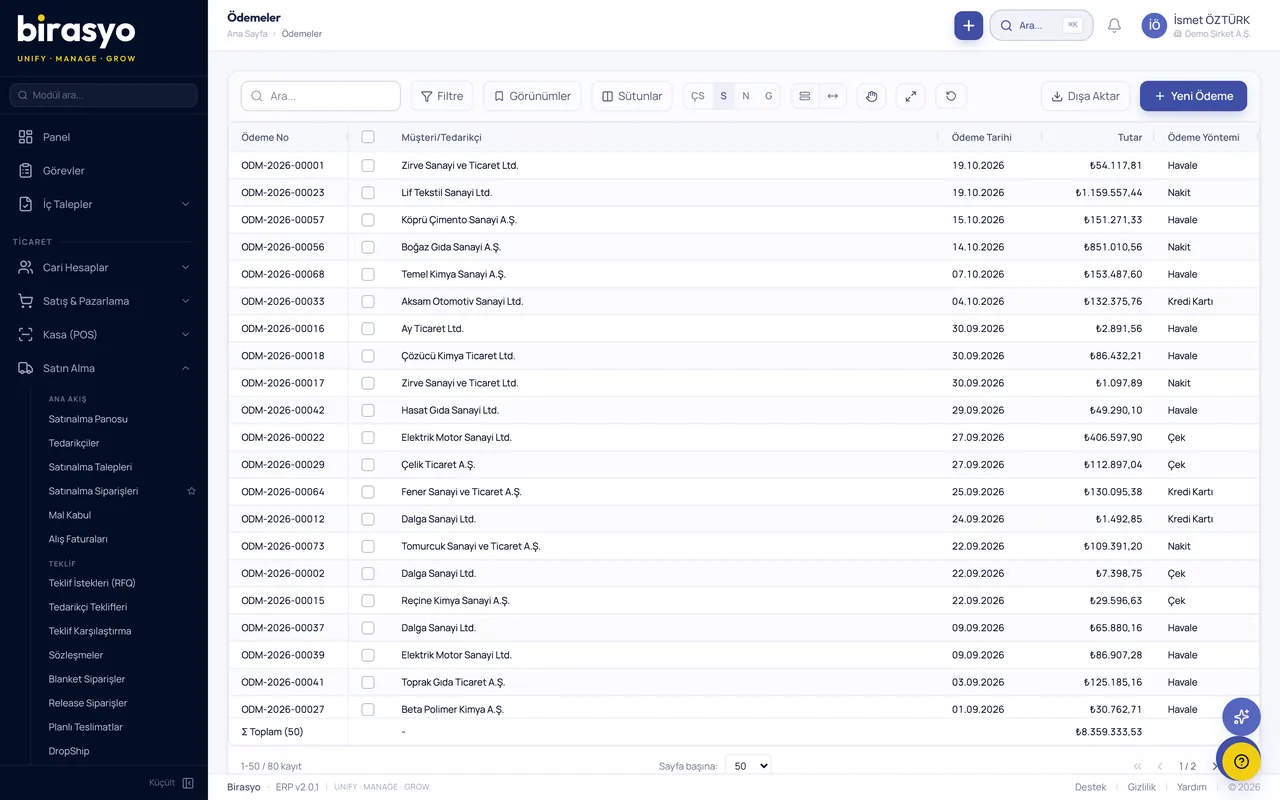
Answers come from the records on these screens
The assistant has no separate data. It answers every question you ask by looking at the records on the screens your employees use every day.
Data and privacy
The first thing people ask about an AI assistant is where the data goes. We explain it in four points.
Security pageWho uses it, and for what?
The assistant works with the records within each person's own permissions.
Management
They ask about revenue, collections and cash position without requesting a report. They see the difference from the previous period without asking separately.
Finance and accounting
They ask about the VAT amount, journal entries awaiting approval and overdue receivables. They leave the matching of statements with collections to the assistant.
Sales
They find out the customer's open orders and balance during the conversation. They have the assistant draft the email to be sent afterwards.
Warehouse and operations
They ask about products that have dropped to a critical level, upcoming maintenance plans and the status of active projects.
Human resources
They ask about the payroll summary, expired documents and open positions. Employees find out their own leave balance themselves.
IT
They connect the assistant to the organisation's own applications through the REST API. Permissions are managed from the same place as the roles in the ERP.
Frequently asked questions
- What happens if the assistant gives a wrong answer?
- The record each answer is based on is shown next to it. You can open the figure and check its source, then approve or correct the answer.
- Is my data used for model training?
- No. The questions you ask and the records used for the answer are not used to train the AI model. The model receives only the records needed to answer your question.
- Can I use Birasyo AI without the other modules?
- Yes. The document reading and question answering functions can be used on their own. When used together with other modules, the answers also cover the records of those modules.
- Which languages does it work in?
- Turkish and English. Other languages are enabled on request.
- Can we connect it to our own application?
- Yes. The assistant comes ready in every module. It can also be connected to your own application through the REST API.
- Our data must stay in Türkiye. Is that possible?
- Yes. If your data must stay in Türkiye, a dedicated setup is made for you in Türkiye.
Let's try your questions with your own data
We do not show a canned demo. We load a sample of your data, ask the assistant three questions you put to someone every day, and you see the answers on screen in your own figures.